
 聊城市专业技术人员继续教育刷课脚本
聊城市专业技术人员继续教育 

# 脚本介绍
该油猴脚本用于 聊城市专业技术人员继续教育 的辅助看课,使用JavaScript编写,适配网址:https://lczj.chinahrt.com/
脚本功能如下:
1.自动播放 检测到视频暂停时自动播放,首次播放失败时尝试点击页面播放按钮
2.倍速播放 默认 2 倍速(可在config中修改,部分课程限制 1.5 倍)
3.防闲置暂停 每 10 秒模拟鼠标移动,避免平台检测「闲置」导致视频暂停
脚本安装地址:
暂时下架
如果不会安装脚本,请按照下面安装教程来操作。
# 代学服务
提示
如需代学,请联系客服,支持闲鱼交易。
微信联系:yizhituziang
QQ联系:2422270452
- img: /img/weixin.jpg
  name: 微信联系:yizhituziang
- img: /img/qq.jpg
  name: QQ联系:2422270452
# 安装教程
# 1.安装浏览器扩展插件
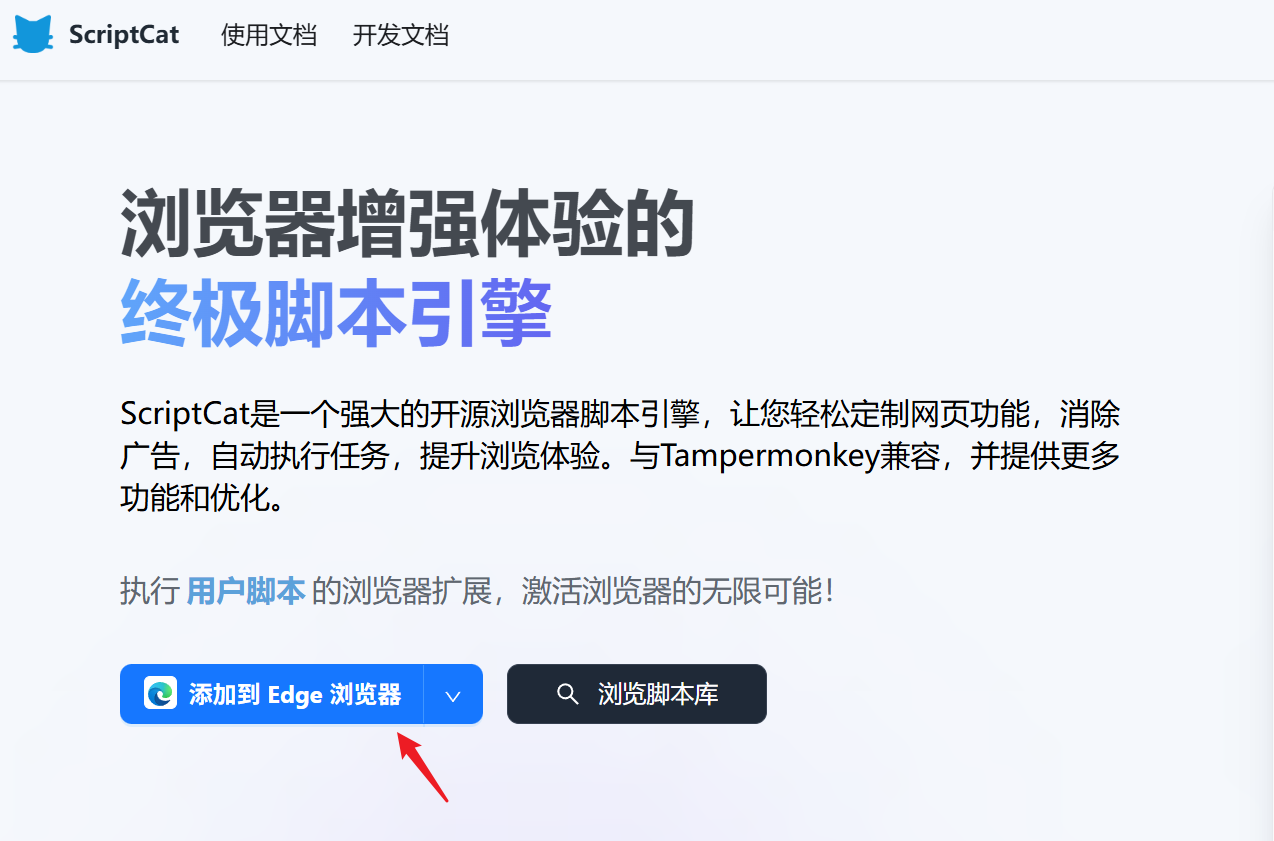
首先需要给我们的浏览器安装上脚本猫插件,这是运行所有用户脚本的基础,如果浏览器已经安装过了脚本猫或者油猴插件,那么可以跳过这一步。推荐使用edge浏览器,安装插件更方便。
浏览器打开网址:https://docs.scriptcat.org/ (opens new window)
这里用edge浏览器作为示范,点击 “添加到Edge浏览器”
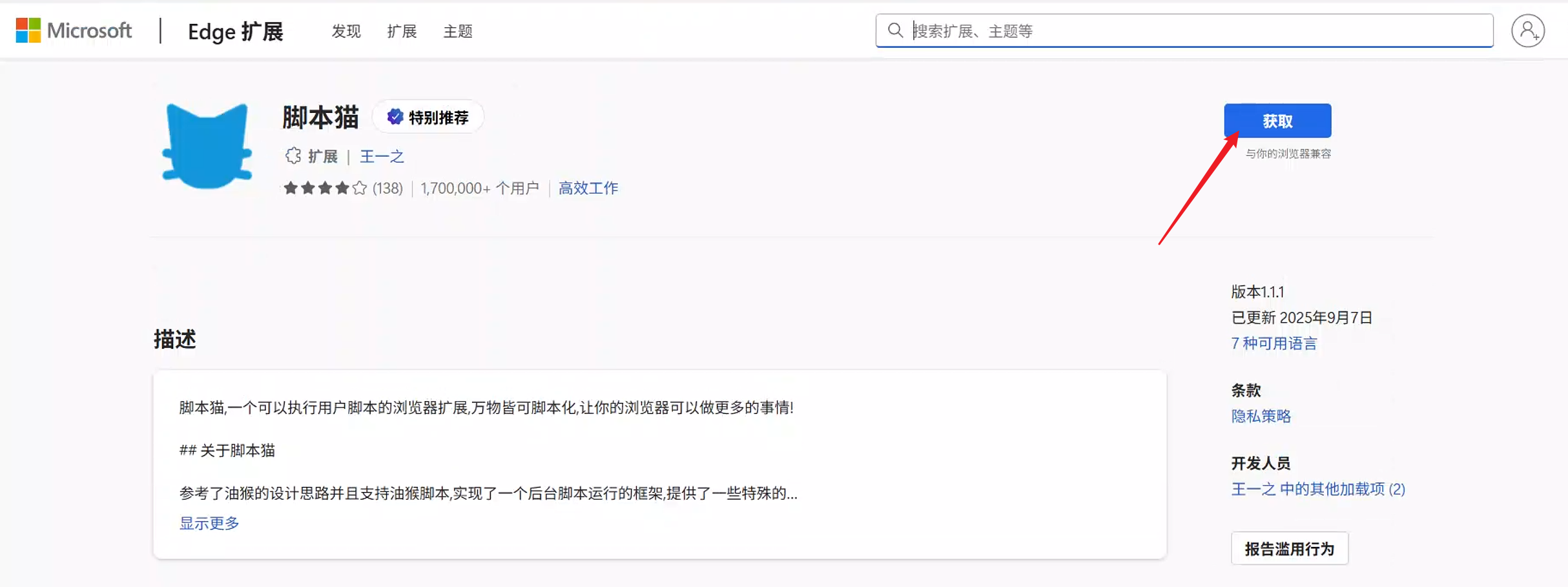
接着点击 “获取”
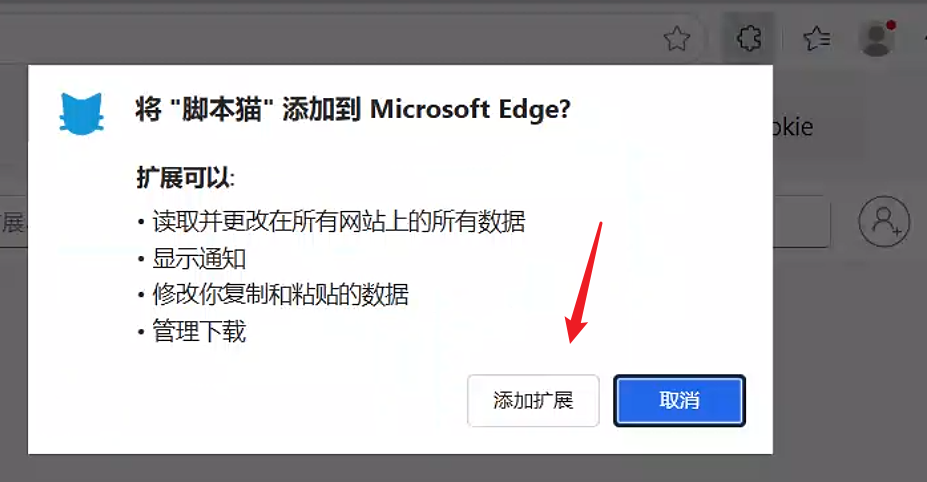
在右上角弹出的窗口,点击 “添加扩展”
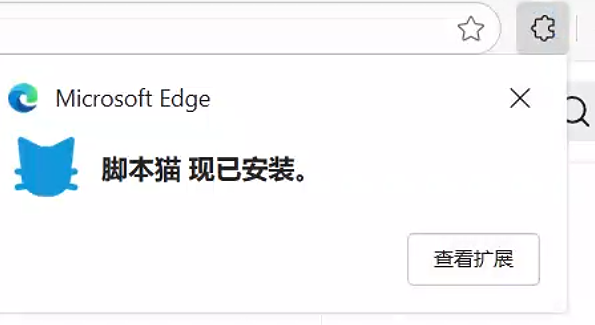
等待几秒钟,会提示已经安装好脚本猫插件了。
# 2.安装刷课脚本
打开脚本安装地址后,在页面点击 “安装脚本” 按钮,接着在弹出的窗口点击 “安装” ,之后就会提示“安装成功”。
# 3.体验脚本功能
安装脚本后,需要重新进入学习站点,如果之前已经打开课程学习页面,那么需要刷新页面后脚本才会生效。
# 核心代码
/**
 * 自动播放视频(处理暂停/播放失败)
 */
function autoPlayVideo() {
		const video = getVideoElement();
		if (!video) return;

		// 1. 非结束状态但暂停时,自动播放
		if (video.paused && !video.ended) {
				video.play().then(() => {
						console.log('[辅助脚本] 视频已自动播放');
				}).catch(err => {
						console.log('[辅助脚本] 自动播放失败,尝试点击播放按钮:', err);
						// 兼容各类播放按钮选择器
						const playBtns = ['.play-btn', '.video-play-btn', '.vjs-big-play-button', '.start-play'];
						playBtns.forEach(selector => {
								const btn = document.querySelector(selector);
								btn && btn.click();
						});
				});
		}

		// 2. 设置播放倍速
		setVideoPlaybackRate();

		// 3. 视频结束后自动切课
		if (config.autoNextLesson && video.ended) {
				autoNextLesson();
		}
}

/**
 * 自动切换下一课
 */
function autoNextLesson() {
		// 兼容常见的下一课按钮选择器(可根据实际页面调整)
		const nextBtns = [
				'.next-lesson', '.btn-next', '.next-course',
				'a[title="下一课"]', '.lesson-next', '.btn-next-lesson'
		];
		const nextBtn = nextBtns.map(sel => document.querySelector(sel)).find(btn => btn);

		if (nextBtn) {
				console.log('[辅助脚本] 视频播放完毕,自动切换下一课');
				nextBtn.click();
		} else {
				console.log('[辅助脚本] 未找到下一课按钮,请手动切换');
		}
}

/**
 * 自动处理中途答题弹窗(选第一个选项并提交)
 */
function autoAnswerQuestion() {
		if (!config.autoAnswer) return;

		// 兼容各类答题弹窗选择器
		const modalSelectors = ['.question-modal', '.exam-popup', '.verify-dialog', '.answer-box'];
		const questionModal = modalSelectors.map(sel => document.querySelector(sel)).find(modal => modal && !modal.hidden);

		if (questionModal) {
				console.log('[辅助脚本] 检测到答题弹窗,自动处理');
				// 选择第一个选项(单选/复选)
				const answerOption = questionModal.querySelector('.answer-option, .radio-option, input[type="radio"], input[type="checkbox"]');
				if (answerOption) {
						answerOption.click();
						// 点击提交/确认按钮
						const confirmBtn = questionModal.querySelector('.btn-confirm, .submit-answer, .btn-sure, .btn-submit');
						confirmBtn && confirmBtn.click();
						console.log('[辅助脚本] 已自动选择答案并提交');
				}
		}
}