
 丽水市建设行业人才继续教育平台刷课脚本
丽水市建设行业人才继续教育平台 

# 脚本介绍
该油猴脚本用于 丽水市建设行业人才继续教育平台 的辅助看课,使用JavaScript编写,适配网址:https://student.lssjsjypxxx.com
脚本功能如下:
1.自动播放视频
2.倍速播放
脚本安装地址:
暂时下架
如果不会安装脚本,请按照下面安装教程来操作。
# 代学服务
提示
如需代学,请联系客服,支持闲鱼交易。
微信联系:yizhituziang
QQ联系:2422270452
- img: /img/weixin.jpg
  name: 微信联系:yizhituziang
- img: /img/qq.jpg
  name: QQ联系:2422270452
# 安装教程
# 1.安装浏览器扩展插件
首先需要给我们的浏览器安装上脚本猫插件,这是运行所有用户脚本的基础,如果浏览器已经安装过了脚本猫或者油猴插件,那么可以跳过这一步。推荐使用edge浏览器,安装插件更方便。
浏览器打开网址:https://docs.scriptcat.org/ (opens new window)
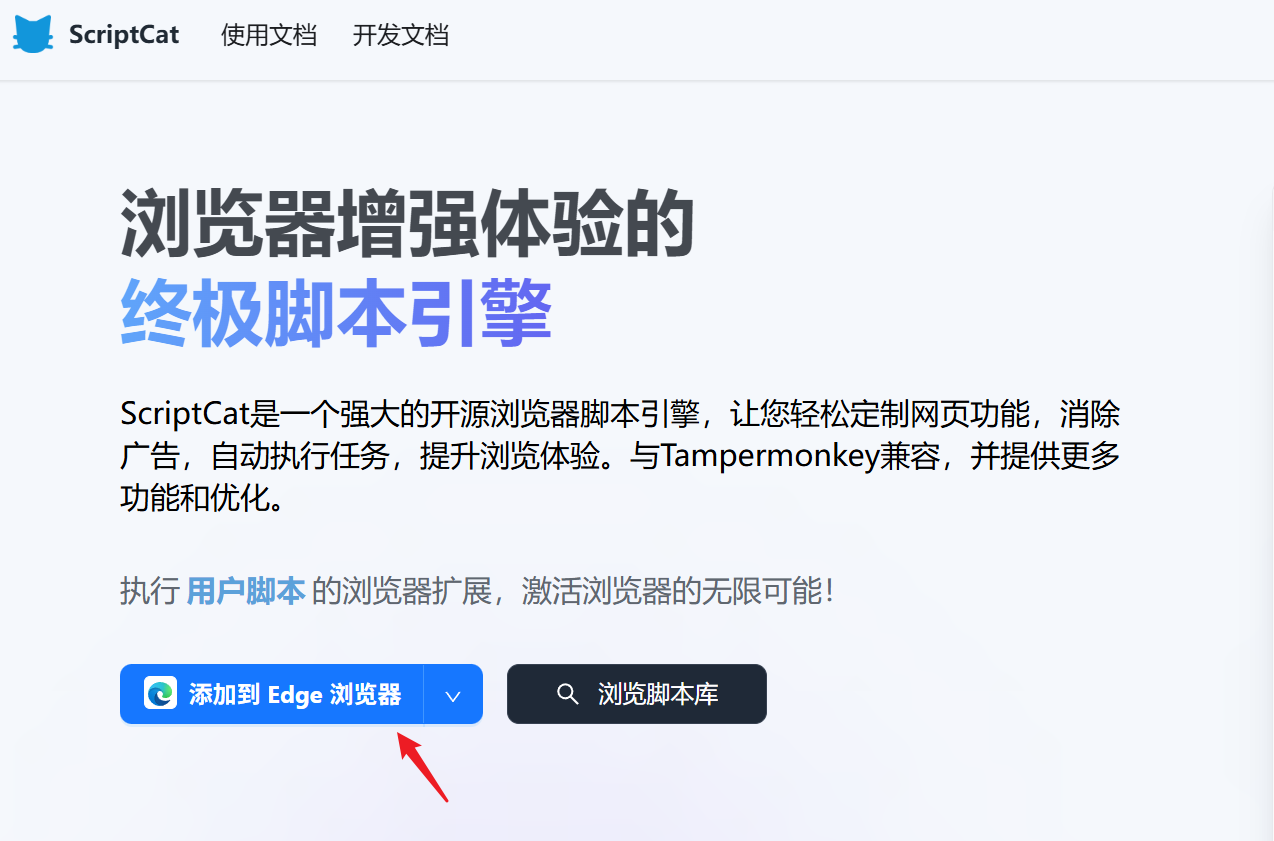
这里用edge浏览器作为示范,点击 “添加到Edge浏览器”
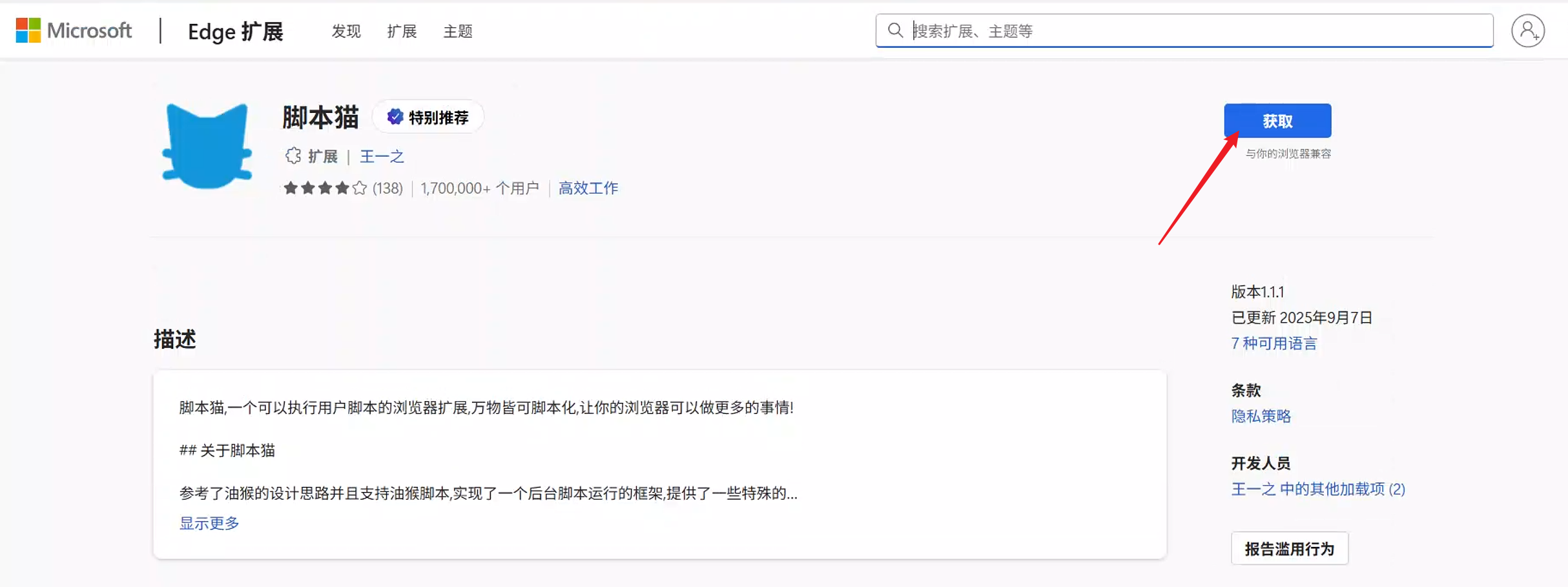
接着点击 “获取”
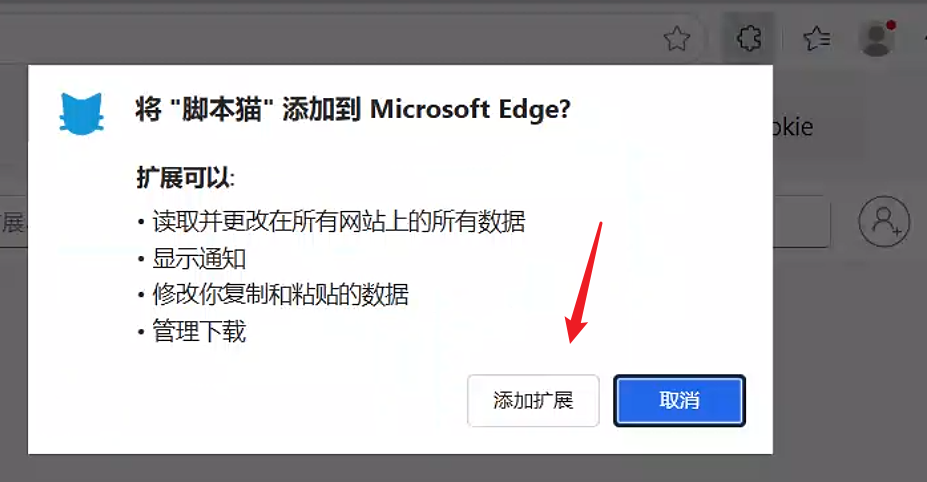
在右上角弹出的窗口,点击 “添加扩展”
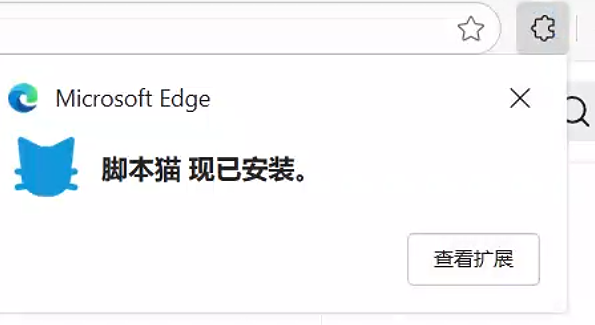
等待几秒钟,会提示已经安装好脚本猫插件了。
# 2.安装刷课脚本
打开脚本安装地址后,在页面点击 “安装脚本” 按钮,接着在弹出的窗口点击 “安装” ,之后就会提示“安装成功”。
# 3.体验脚本功能
安装脚本后,需要重新进入学习站点,如果之前已经打开课程学习页面,那么需要刷新页面后脚本才会生效。
# 核心代码
// ==UserScript==
// @name         丽水市建设行业人才继续教育平台 - 辅助看课脚本
// @namespace    http://tampermonkey.net/
// @version      1.1
// @description  自动播放视频、跳过广告、防止暂停、自动静音、倍速播放,支持进度条拖动检测。
// @author       Your Name
// @match        https://student.lssjsjypxxx.com/*
// @icon         https://www.google.com/s2/favicons?sz=64&domain=lssjsjypxxx.com
// @grant        GM_addStyle
// @grant        GM_registerMenuCommand
// @run-at       document-idle
// @license      MIT
// ==/UserScript==

(function() {
    'use strict';

    // --- 配置区域 ---
    const config = {
        playbackRate: 1.5,         // 默认播放倍速
        checkInterval: 2000,       // 检查和操作的时间间隔(毫秒)
        maxAttempts: 30,           // 查找视频的最大尝试次数
        autoMute: true,            // 是否自动静音
        enableDragDetection: true, // 是否启用进度条拖动检测
    };
    // --- 配置区域结束 ---

    let videoElement = null;
    let lastCurrentTime = 0;
    let attemptCount = 0;
    let isAdPlaying = false;

    // 注册一个菜单命令,方便用户重新加载配置
    GM_registerMenuCommand("重新加载脚本配置", () => {
        location.reload();
    });

    // 1. 注入自定义CSS样式
    GM_addStyle(`
        #script-control-panel {
            position: fixed;
            top: 20px;
            right: 20px;
            background: rgba(0, 0, 0, 0.8);
            color: white;
            padding: 15px;
            border-radius: 10px;
            z-index: 99999999;
            font-size: 12px;
            box-shadow: 0 4px 15px rgba(0,0,0,0.5);
            min-width: 200px;
        }
        #script-control-panel h3 {
            margin: 0 0 10px 0;
            text-align: center;
            border-bottom: 1px solid #555;
            padding-bottom: 5px;
        }
        #script-control-panel p {
            margin: 5px 0;
        }
        #script-control-panel .status-active { color: #4CAF50; }
        #script-control-panel .status-inactive { color: #FF5252; }
        #script-control-panel .btn-group {
            display: flex;
            justify-content: space-between;
            margin-top: 10px;
        }
        #script-control-panel button {
            background-color: #007bff;
            color: white;
            border: none;
            padding: 5px 10px;
            border-radius: 3px;
            cursor: pointer;
            font-size: 11px;
        }
        #script-control-panel button:hover {
            background-color: #0056b3;
        }
        #script-control-panel .playback-rate-btn {
            background-color: #28a745;
        }
        #script-control-panel .playback-rate-btn:hover {
            background-color: #218838;
        }
        #script-control-panel .mute-btn {
            background-color: #ffc107;
        }
        #script-control-panel .mute-btn:hover {
            background-color: #e0a800;
        }
        #script-control-panel .ad-warning {
            color: #FF5252;
            font-weight: bold;
            text-align: center;
            margin-top: 10px;
            animation: blink 1s linear infinite;
        }
        @keyframes blink {
            50% { opacity: 0; }
        }
    `);

    // 2. 创建控制面板
    function createControlPanel() {
        const panel = document.createElement('div');
        panel.id = 'script-control-panel';
        panel.innerHTML = `
            <h3>脚本控制中心</h3>
            <p>脚本状态: <span id="script-status" class="status-active">运行中</span></p>
            <p>视频状态: <span id="video-status">未找到</span></p>
            <p>当前倍速: <span id="current-rate">--</span>x</p>
            <div class="btn-group">
                <button id="speed-up-btn" class="playback-rate-btn">提速 (1.5x)</button>
                <button id="mute-toggle-btn" class="mute-btn">静音</button>
            </div>
            <div id="ad-warning-area"></div>
        `;
        document.body.appendChild(panel);

        // 绑定按钮事件
        document.getElementById('speed-up-btn').addEventListener('click', () => setPlaybackRate(config.playbackRate));
        document.getElementById('mute-toggle-btn').addEventListener('click', toggleMute);
    }

    // 3. 更新面板状态
    function updatePanelStatus() {
        if (!videoElement) {
            document.getElementById('video-status').textContent = '未找到';
            document.getElementById('current-rate').textContent = '--';
            return;
        }

        document.getElementById('video-status').textContent = videoElement.paused ? '已暂停' : '播放中';
        document.getElementById('current-rate').textContent = videoElement.playbackRate.toFixed(1);
        document.getElementById('mute-toggle-btn').textContent = videoElement.muted ? '取消静音' : '静音';

        // 广告检测
        const adWarningArea = document.getElementById('ad-warning-area');
        if (isAdPlaying) {
            adWarningArea.innerHTML = '<div class="ad-warning">检测到广告,正在跳过...</div>';
        } else {
            adWarningArea.innerHTML = '';
        }
    }

    // 4. 核心功能函数
    function setPlaybackRate(rate) {
        if (videoElement && !isNaN(rate)) {
            videoElement.playbackRate = rate;
            console.log(`[脚本] 播放速度已设置为: ${rate}x`);
            updatePanelStatus();
        }
    }

    function toggleMute() {
        if (videoElement) {
            videoElement.muted = !videoElement.muted;
            console.log(`[脚本] 静音状态已切换为: ${videoElement.muted}`);
            updatePanelStatus();
        }
    }

    function autoPlayVideo() {
        if (videoElement && videoElement.paused) {
            // 检查是否是拖动进度条导致的暂停
            const timeDiff = Math.abs(videoElement.currentTime - lastCurrentTime);
            if (config.enableDragDetection && timeDiff > 1 && !isAdPlaying) {
                console.log(`[脚本] 检测到进度条拖动 (差值: ${timeDiff.toFixed(2)}s),本次不自动播放。`);
                lastCurrentTime = videoElement.currentTime;
                return;
            }
            videoElement.play().catch(err => console.warn('[脚本] 自动播放失败:', err));
            console.log('[脚本] 检测到视频暂停,已自动播放。');
        }
    }

    function skipAds() {
        // 策略1: 查找常见的跳过广告按钮
        const skipButton = document.querySelector('.vjs-skip-ad, .skip-ad, .ad-skip-button, .jw-skip-ad, .jw-button-container .jw-button[aria-label*="跳过"]');
        if (skipButton && skipButton.offsetParent !== null) {
            skipButton.click();
            isAdPlaying = false;
            console.log('[脚本] 已点击 "跳过广告" 按钮。');
            return;
        }

        // 策略2: 检测广告容器并直接播放主视频
        const adContainer = document.querySelector('.vjs-ad-playing, .ad-container, .jw-ad-playing');
        if (adContainer) {
            isAdPlaying = true;
            console.log('[脚本] 检测到广告正在播放。');
        } else {
            isAdPlaying = false;
        }
    }

    // 5. 主循环
    function mainLoop() {
        // 尝试获取视频元素,如果之前没找到
        if (!videoElement) {
            // 兼容多种可能的视频选择器
            videoElement = document.querySelector('video, .vjs-tech, #video-player, .video-js video');
            if (videoElement) {
                console.log('[脚本] 成功找到视频元素!');
                // 初始设置
                if (config.autoMute) videoElement.muted = true;
                setPlaybackRate(config.playbackRate);
                videoElement.play().catch(err => console.warn('[脚本] 初始播放失败:', err));
            } else {
                attemptCount++;
                if (attemptCount > config.maxAttempts) {
                    console.warn(`[脚本] 经过 ${config.maxAttempts} 次尝试后仍未找到视频,脚本暂停查找。请刷新页面重试。`);
                    document.getElementById('script-status').className = 'status-inactive';
                    document.getElementById('script-status').textContent = '已暂停';
                    // 可以选择在这里停止脚本
                    // return;
                }
            }
        }

        if (videoElement) {
            skipAds();
            autoPlayVideo();
            lastCurrentTime = videoElement.currentTime;
        }

        updatePanelStatus();
        setTimeout(mainLoop, config.checkInterval);
    }

    // 6. 启动脚本
    window.addEventListener('load', () => {
        createControlPanel();
        mainLoop();
    });

})();